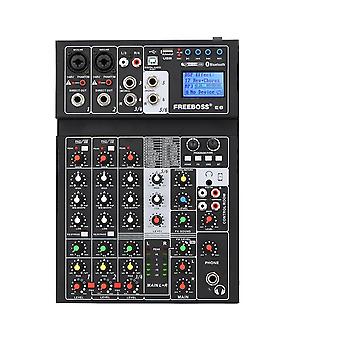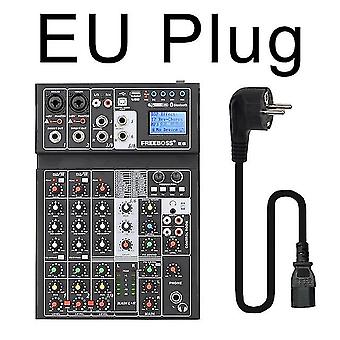
Freeboss E6 6 Channel Bluetooth 24 Dsp Effect Usb Record Computer Record Karaoke Party Studio Mobile Live Broadcast Audio Mixer

₩446,390
무료 배송

Freeboss E6 6 Channel Bluetooth 24 Dsp Effect Usb Record Computer Record Karaoke Party Studio Mobile Live Broadcast Audio Mixer

  • 브랜드: Unbranded

Freeboss E6 6 Channel Bluetooth 24 Dsp Effect Usb Record Computer Record Karaoke Party Studio Mobile Live Broadcast Audio Mixer

  • 브랜드: Unbranded
가격: ₩446,390
판매자::
₩446,390
무료 배송

재고 있음

14일 반품 정책

결제 방법:

설명

Freeboss E6 6 Channel Bluetooth 24 Dsp Effect Usb Record Computer Record Karaoke Party Studio Mobile Live Broadcast Audio Mixer

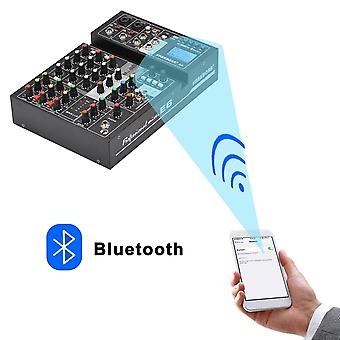
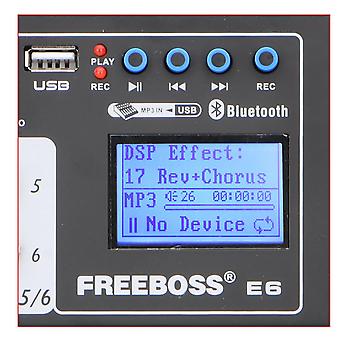
E6 Freeboss E6 6 Channel Bluetooth 24 Dsp effect USB Record Computer Record Karaoke Party Studio Mobile Live Broadcast o Mixer Click to go to XLR cable listing: 1. 24 DSP Effect 2. Individual +48V phantom power 3. Bluetooth 4. USB play, record 5. Computer play, record 6. Mobile play, record-----Live broadcast 1.You can connect your mobile to Mixer via the USB interface of the mixer 2. Mixer can receive the signal from Mobile, and Mobile can receive the signal from Mixer. Please note: Type-B is for Mobile, PC Type-A is for USB stick. it is not for usb microphone. 1. You can connect your computer to Mixer via the USB interface of the mixer 2. Mixer can receive the signal from computer, and computer can receive the signal from Mixer. PC play: you can play music from PC to mixer.--You need a pc music play software PC record: You can record the sound from mixer--you need a pc record software. 24 DSP Effect How to adjust the effect: 1. Press "FX" button into choose effect status 2. Rotate the "Select" Knob to choose the effect you like. 3. Press the "Select" Knob to confirm the effect 4. Press "FX" button again, come into the status of the parameters adjst. 5. Rotate the "Select" knob to choose the parameter 6. Rotate the "Edit" knob to adjust the parameter. 7. Press the "Edit" knob to comfirm the parameter. 8. Rotate the "FX SOUND" knob to adjust the main input. 9. Rotate the channel "FX" to adjust the channel output. 1. There are 2 XLR channels, ecah channel has one phantom power switch. 2. Dynamic microphone : Do not open phantom power (please use XLR plug,not a 6.3 plug,because use the 6.3 plug,the sound will be too small.) 3. Condenser microphone: Press the button to supply +48V phantom power. (Please note: please confirm if your condenser microphone support +48V phantom power.) 1. Press "BT" for 3 seconds. 2. Screen will show: Waiting BT 3. Setting your mobile to Connect the o mixer 4. Screen will show: Playing BT 5. Rotate the "Digital return-PAN" knob to adjust the Left and Right 6. Rotate the "Digital return-LEVEL" knob to adjust the input volume. 7. Rotate the Main mix knob to adjust the output volume. 1. when there is no USB stick, Screen will show: NO Device 2. Insert the USB stick with music, the screen will show the 1st music name, and will be in "PAUSE" status. 3.
  • 브랜드: Unbranded
  • 카테고리: 스피커
  • Fruugo ID: 231463932-494288938
  • EAN: 889613340457

배송 및 반품

2일 이내에 발송됨

  • STANDARD: 무료 - 배달 사이 화 06 1월 2026–월 12 1월 2026 - 무료

중국에서 발송.

당사는 귀하께서 주문하신 제품이 주문 명세에 따라 빠짐없이 배송되도록 온 힘을 기울이고 있습니다. 다만, 주문하신 것과 다른 상품이 배송되거나 빠진 상품이 있는 경우, 또는 주문 내용에 만족할 수 없는 다른 이유가 있는 경우에는 주문 전체나 주문에 포함된 일부 제품을 반품하시고 해당 상품에 대해 전액 환불받으실 수 있습니다. 전체 반품 정책 보기

製品コンプライアンスの詳細

以下に概説されているこの製品に固有のコンプライアンス情報を参照してください。

以下の情報は、この製品を販売する独立したサードパーティ小売業者によって提供されています。

제조사:
다음 정보는 Fruugo에서 판매되는 관련 상품의 제조사 연락처입니다.

  • Fuzhou Oulibogexiangbao Youxiangongsi
  • Fuzhou Oulibogexiangbao Youxiangongsi
  • Gulouqu beihuanxilu108hao yonghengxincun7zuo 2bdanyuan
  • Fuzhou
  • CN
  • 350001
  • ffzzbg@outlook.com
  • 8618359831991

EU 내 책임자:
다음 정보는 EU 내 책임자 연락처입니다. 책임자는 유럽 연합에서 판매되는 관련 상품에 대한 준수 의무에 책임을 지는 EU에 기반을 둔 지정 경제 주체를 말합니다.

  • EC REP SERVICES SL
  • EC REP SERVICES SL
  • C/GRAN VIA 49, 7 DCH
  • MADRID
  • ES
  • 28013
  • ECREPSERVICE@HOTMAIL.COM
  • 34 910563102